Blooket has rapidly emerged as one of the most engaging, versatile, and teacher-friendly platforms in the world of educational technology. If you’re searching for information on “Blooket”—whether you’re a teacher, student, or parent—this comprehensive guide will walk you through everything you need to know: what Blooket is, how it works, its benefits, popular game modes, tips for effective use, and how it’s transforming classrooms and learning environments around the world.
What is Blooket?
Blooket is an online, game-based learning platform designed to make quizzes, reviews, and formative assessments fun and interactive. Launched in 2020 by Tom and Ben Stewart, Blooket allows teachers to create or choose question sets and host live games, while students join on their own devices using a game code. The platform is web-based—no downloads required—and works on computers, tablets, and smartphones.
Blooket’s core idea is simple: turn traditional question-and-answer activities into fast-paced, competitive games where students can earn points, unlock characters (called “Blooks”), and compete individually or in teams. The result is increased engagement, motivation, and retention—making learning feel more like play than work.
Key Features of Blooket
- Easy Game Creation: Teachers can import question sets from Quizlet, create sets from scratch, or use Blooket’s library of public question sets.
- Multiple Game Modes: Choose from a variety of game modes like Tower Defense, Gold Quest, Café, and more—each with unique mechanics.
- Live and Homework Options: Host live games in class or assign sets as homework that students can complete at their own pace.
- Customizable: Tailor games to curriculum topics, difficulty levels, and time limits.
- Student-Centric: Players join with a simple code and don’t need to create accounts (unless tracking progress or earning rewards).
- Engaging Visuals: Colorful graphics, avatars, and sound effects make the experience lively and memorable.
- Analytics: Teachers can view reports on student performance for assessment and feedback.
How Does Blooket Work?
1. Teacher Creates or Selects a Question Set
Teachers can:
- Create their own question sets (multiple-choice or true/false).
- Import sets from Quizlet or use existing public sets shared by other educators.
2. Choose a Game Mode
Each game mode offers a unique way to play, from competitive races to strategy-based challenges. The teacher selects the mode that best fits the lesson or desired classroom energy.
3. Host the Game
The teacher launches the game and receives a unique join code.
4. Students Join
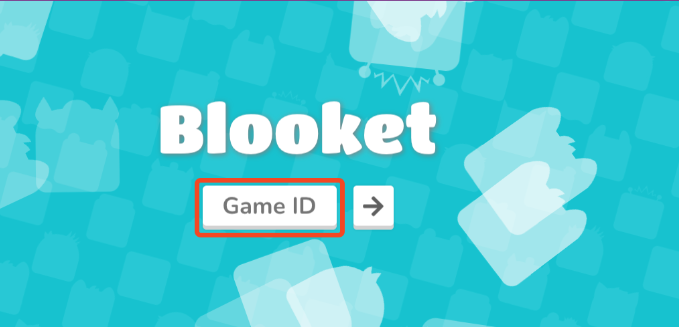
Students go to blooket.com/play, enter the join code, and select their nickname and Blook (avatar). No student accounts required for basic play.
5. Play and Learn
The game begins! Students answer questions, earn points or resources, and compete according to the rules of the selected mode. The teacher can monitor progress in real time.
6. Review and Results
At the end, teachers can review results, discuss answers, and provide feedback. Reports can be used for formative assessment or grading.
Popular Blooket Game Modes
Blooket’s appeal lies in its game variety. Here are some of the most popular modes:
1. Tower Defense
Players answer questions to earn points, which they use to build towers that defend against waves of enemies. It’s a blend of strategy and quiz knowledge.
2. Gold Quest
Answer questions to open chests and collect gold. Random events (stealing, swapping, bonus chests) keep the competition fierce and unpredictable.
3. Café
Students manage a café, serving customers by answering questions. The faster and more accurately they answer, the more successful their café.
4. Factory
Players upgrade their factory by answering questions, aiming to produce as much as possible before time runs out.
5. Racing
A fast-paced game where correct answers move students along a race track. The first to the finish line wins.
6. Battle Royale
Students face off in head-to-head question rounds, with the winner advancing. It’s elimination-style and highly competitive.
7. Classic
The traditional quiz mode: answer questions, earn points, and see who tops the scoreboard.
8. Crypto Hack
Players try to hack and collect crypto coins by answering questions and making strategic choices.
9. Crazy Kingdom
A resource management simulation where answering questions helps manage a kingdom and its quirky citizens.
Solo and Homework Modes
Many modes can be played solo or assigned as homework, allowing students to learn at their own pace outside class.
Why Teachers and Students Love Blooket
For Teachers:
- Engagement: Blooket turns review and assessment into a game, increasing participation and excitement.
- Flexibility: Can be used for any subject or grade, from spelling and math to science and history.
- Formative Assessment: Instant feedback and analytics help teachers gauge understanding.
- Easy Setup: Minimal prep time, especially with the public question set library.
- Classroom Management: Keeps students focused, on-task, and motivated.
For Students:
- Fun: Feels like playing a game, not taking a test.
- Friendly Competition: Encourages students to do their best.
- Variety: Different modes mean lessons never feel repetitive.
- No Logins Needed: Quick and easy to join.
- Rewards: Earning Blooks and unlocking new avatars adds a layer of achievement.
How Blooket is Used in the Classroom
- Warm-Up Activities: Start class with a quick Blooket to review previous material.
- Lesson Reinforcement: Use Blooket during or after teaching new content for immediate practice.
- Test Review: Make studying for quizzes and exams interactive.
- Homework Assignments: Assign games students can play at home.
- Formative Assessment: Use analytics to identify topics that need more attention.
- Remote and Hybrid Learning: Works great for distance learning and virtual classrooms.
Blooket Plus: Premium Features
While Blooket is free for basic use, there’s a paid version—Blooket Plus—that offers advanced features:
- Enhanced game reports and analytics
- Student progress tracking
- Early access to new game modes
- Expanded customization options
- Priority support
Blooket Plus is popular with schools and teachers who want deeper insights and more flexibility.
Safety, Privacy, and Student Data
Blooket is designed with privacy in mind:
- Students do not need to create accounts for basic play.
- No personal information is required to join games.
- The platform complies with student privacy regulations (like COPPA and FERPA in the US).
- Teachers have control over game settings, privacy, and access.
Blooket Community, Updates, and Support
Blooket has a thriving online community of teachers and students. The company regularly updates the platform with new features, seasonal events, and game modes. Teachers can find inspiration, question sets, and tips through:
- Blooket’s official blog and social media
- Educator forums and Facebook groups
- YouTube channels with tutorials and classroom ideas
Support is available via the Blooket website, with FAQs, troubleshooting, and contact forms for technical help.
Tips for Maximizing Blooket in Your Teaching
- Mix Up Game Modes: Keep engagement high by rotating through different game types.
- Use Public Sets: Save time by leveraging existing question sets, or modify them for your needs.
- Set Clear Expectations: Remind students about fair play and focus on learning, not just winning.
- Encourage Reflection: After games, discuss challenging questions and celebrate improvement.
- Track Progress: Use analytics to identify strengths and areas for review.
- Get Creative: Try themed games for holidays, special events, or cross-curricular connections.
Frequently Asked Questions About Blooket
Q: Is Blooket free to use?
A: Yes! Blooket offers a robust free version. Blooket Plus is available for advanced features.
Q: Can Blooket be used for subjects other than math or science?
A: Absolutely. Blooket is subject-agnostic—use it for language arts, history, music, foreign languages, and more.
Q: Is Blooket suitable for elementary students?
A: Yes, with teacher supervision. Blooket’s simple interface and fun graphics appeal to all ages.
Q: Can students play on their own?
A: Yes, teachers can assign solo or homework games students complete at their own pace.
Q: Are there accessibility features?
A: Blooket is web-based and works with most devices and screen readers. Teachers can create questions tailored to student needs.
Q: How is Blooket different from Kahoot or Quizizz?
A: Blooket offers unique game modes (like Tower Defense and Crazy Kingdom), a distinct visual style, and flexible solo/homework options. Many teachers use multiple platforms for variety.
Potential Limitations and Considerations
- Internet Access Required: Reliable internet is needed for live games.
- Limited Question Types: Currently focused on multiple-choice and true/false.
- Competition Pressure: Some students may feel stress from competitive modes—teachers should balance game types.
- Premium Features: Some advanced analytics and options require a subscription.
The Future of Blooket
Blooket is rapidly expanding its features, game modes, and community resources. The platform’s team is dedicated to continuous improvement, listening to teacher feedback, and staying at the forefront of game-based learning.
- Upcoming features may include: More question types, adaptive learning, expanded reporting, and deeper integrations with classroom management tools.
Conclusion: Why Blooket is Transforming Learning
Blooket has taken the simple quiz and turned it into an exciting, interactive experience for students and teachers alike. Its combination of fun, competition, and educational value makes it one of the most popular edtech tools in use today. Whether you’re a teacher looking to spice up your lessons, a student eager to review in a new way, or a parent seeking engaging learning tools, Blooket is worth a try.
With its user-friendly design, a wealth of customizable content, and commitment to student privacy, Blooket is poised to remain at the forefront of interactive, game-based learning for years to come.