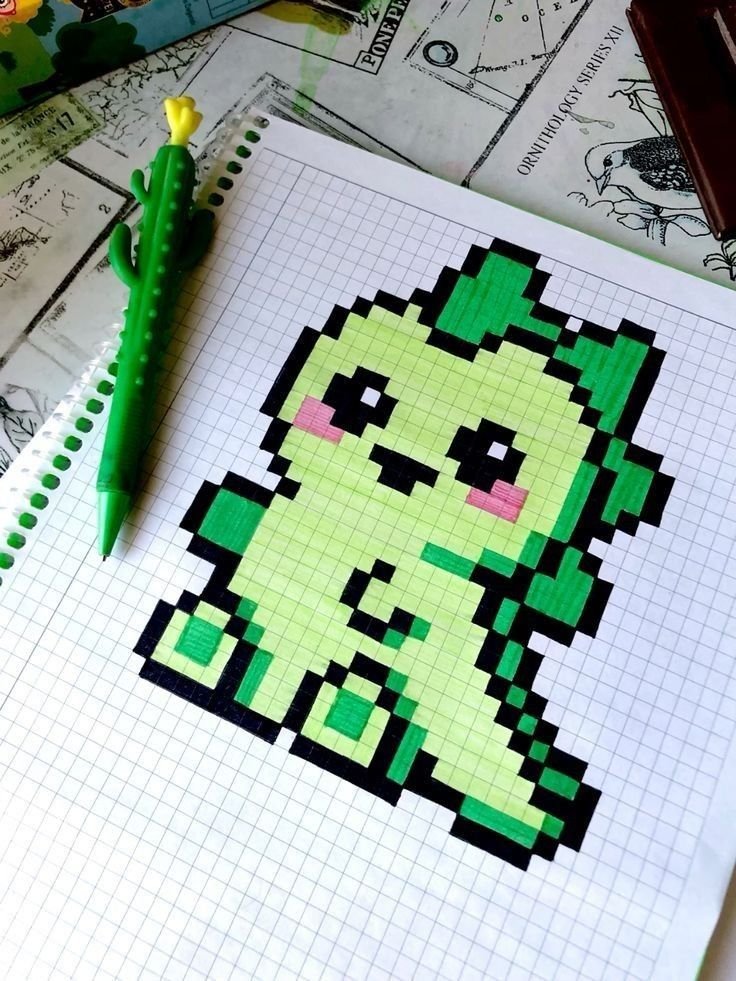
Pixel art is a digital art form that uses tiny squares (pixels) to create visually captivating images, ranging from simple icons to complex scenes. Popularized in video games and now a vibrant genre of its own, pixel art appeals to artists of all skill levels. Whether you’re just starting or looking to push your skills further, this comprehensive guide explores creative pixel art ideas, themes, techniques, and tips for bringing your visions to life.
What Is Pixel Art?
Pixel art is the process of composing images pixel by pixel. Unlike high-resolution art, pixel art thrives on minimalism and clever use of color and shape. Classic arcade games, retro consoles, and modern indie titles all feature pixel art, making it both nostalgic and innovative.
Getting Started: Tools and Basics
- Software: Try Aseprite, Piskel, Pixilart, or even Microsoft Paint for simple projects.
- Canvas Size: Start small (16×16 or 32×32 pixels) to practice control and detail.
- Color Palette: Use limited colors—classic palettes are 8, 16, or 32 colors.
- Zoom: Work at high zoom for detail, but check your art at 1:1 scale for clarity.
Beginner Pixel Art Ideas
- Emoji and Icons: Create simple smiley faces, hearts, or arrows. Great for learning symmetry and basic shading.
- Fruit and Food: Apples, bananas, cupcakes, or sushi. These offer practice with rounded shapes and gradients.
- Animals: Try a cat, bird, or fish in 16×16 or 32×32 pixels. Focus on silhouette and color blocking.
- Plants and Flowers: Potted plants, sunflowers, or mushrooms. Perfect for organic shapes and natural color blending.
- Weather Symbols: Sun, clouds, rain, and lightning. Good for testing out dithering and animation basics.
Intermediate Pixel Art Ideas
- Game Sprites: Design a character for a side-scrolling platformer or RPG. Experiment with walk cycles and idle animations.
- Buildings: Houses, castles, or modern cityscapes. Practice perspective and texture (bricks, wood, glass).
- Vehicles: Cars, spaceships, or boats. Explore metallic surfaces and motion blur effects.
- Fantasy Creatures: Dragons, goblins, or robots. Unleash creativity with color and shapes.
- Isometric Rooms: Create a 3D illusion by drawing a cozy bedroom, shop, or dungeon from an angled viewpoint.
Advanced Pixel Art Ideas
- Full Scenes: Landscapes, forests, or city skylines at sunset. Combine backgrounds, midgrounds, and foregrounds for depth.
- Game Mockups: Invent an entire game screen—UI, characters, enemies, and environment.
- Large Portraits: Reimagine famous artworks or original characters at a larger canvas size (64×64 or 128×128 pixels).
- Animated Tilesets: Create seamless tiles for water, fire, grass, or animated environmental effects.
- Retro Game Covers: Pay homage to classic NES or Game Boy box art with your own interpretation.
Thematic Pixel Art Ideas
- Seasonal Art: Snowy winter villages, autumn leaves, or summer beaches.
- Space and Sci-Fi: Planets, astronauts, alien landscapes, or futuristic vehicles.
- Medieval Fantasy: Knights, castles, dragons, and magical forests.
- Modern Life: Cafés, city nights, street scenes, or transportation hubs.
- Nature and Wildlife: Forest animals, mountain ranges, underwater scenes.
Challenges for Creative Growth
- Daily Pixel Doodle: Draw one small piece every day for a month.
- Palette Challenge: Restrict yourself to only 4 or 8 colors.
- Minimalism: Create recognizable objects using as few pixels as possible.
- Collaboration: Join online pixel art jams where artists build scenes together.
- Fan Art: Recreate your favorite character or scene from books, movies, or games in pixel form.
Tips for Improving Your Pixel Art
- Use Layers: Most pixel art programs support layers—helpful for separating linework from color.
- Master Dithering: Use two colors in a checkerboard or gradient pattern to simulate new shades.
- Outline Strategically: Black outlines add definition, but colored outlines can blend objects with backgrounds.
- Keep It Readable: At small sizes, clarity is key. Remove unnecessary pixels that clutter the image.
- Study the Masters: Analyze art from classic games or top pixel artists for ideas and techniques.
- Get Feedback: Share your work on forums like Pixel Joint, Reddit, or Discord for constructive critique.
Pixel Art in Games and Media
- Classic Inspiration: Look to games like Super Mario Bros., The Legend of Zelda, and Pokémon for foundational styles.
- Modern Indie Hits: Games like Stardew Valley, Celeste, and Hyper Light Drifter show the versatility of pixel art today.
- Social Media: Many artists share pixel art on Instagram, Twitter, and specialized galleries for inspiration.
Frequently Asked Questions
Q: How do I start pixel art if I’ve never drawn before? A: Begin with small, simple subjects (like a smiley face or apple), use a limited color palette, and practice regularly.
Q: What canvas size is best for beginners? A: 16×16 or 32×32 pixels are ideal for learning control and detail.
Q: How do I animate pixel art? A: Use software with frame-by-frame support. Start with simple animations, like blinking eyes or bouncing balls.
Q: Where can I share my pixel art? A: Online communities like Pixel Joint, DeviantArt, and Reddit are great places for feedback and inspiration.
Conclusion
Pixel art is a uniquely rewarding art form that blends creativity, technical skill, and nostalgia. Whether you’re crafting simple icons or sprawling fantasy scenes, there’s always a new idea to explore and a new challenge to tackle. Use these pixel art ideas as a springboard for your own creations, and remember—every masterpiece starts with a single pixel!