Abdul haye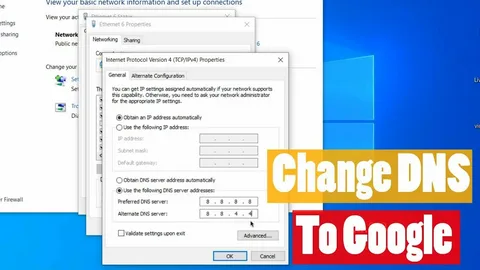
When people talk about fast and reliable internet, they often mention a strange-looking set of numbers: 8.8.8.8. At first glance, it looks like just another IP address—something technical that belongs in a router manual. But in reality, 8.8.8.8 has become one of the most recognizable numbers in the digital world. It powers millions of internet connections worldwide, and for many users, it instantly fixes browsing problems with a single change.
So what exactly is, why is it so popular, and how can it benefit your online experience? Let’s break it down in a simple, human style.
What Is 8.8.8.8?
8.8.8.8 is a public DNS server operated by Google. DNS stands for Domain Name System, which acts like the “phonebook” of the internet. When you type a website name like youtube.com or facebook.com, the DNS converts that name into an IP address so your device knows where to go.
Think of DNS as the internet’s translator.
-
You type words (e.g., google.com)
-
DNS finds the matching IP (e.g., 142.250.xxx.xxx)
-
Your browser connects to the site
Google created 8.8.8.8 as part of Google Public DNS, a fast, free, and global DNS service available to everyone.
Why 8.8.8.8 Became So Popular
There are thousands of DNS servers in the world, but 8.8.8.8 stands out because of its speed, reliability, and simplicity.
Here’s why millions prefer it:
1. Easy to Remember
Most DNS servers look like random numbers. But 8.8.8.8 is:
-
clean
-
simple
-
easy to type
-
impossible to forget
This alone makes it the most recognizable DNS ever.
2. Lightning-Fast Resolution
Google’s massive global infrastructure allows 8.8.8.8 to resolve domain names faster than many local ISPs.
A faster DNS means:
-
quicker website loading
-
reduced buffering
-
better gaming ping
3. High Reliability
Google operates servers across the globe, ensuring:
-
low downtime
-
stable performance
-
automatic failover
The reliable availability is one of the reasons IT professionals recommend it.
4. Useful for Fixing Internet Problems
Sometimes, your ISP’s DNS:
-
becomes slow
-
stops working
-
blocks certain sites
Switching to 8.8.8.8 often fixes these issues instantly.
That’s why many tutorials say:
“If the internet is slow, change your DNS to 8.8.8.8.”
5. Free for Everyone
You don’t need an account, login, money, or permission.
It works worldwide, in every country.
What Is the Secondary DNS for 8.8.8.8?
Google never provides a single DNS server. It always has a backup.
The partner DNS is:
-
8.8.4.4 (secondary DNS)
When you set up DNS on your router or device, you usually enter both:
-
Primary: 8.8.8.8
-
Secondary: 8.8.4.4
This ensures stability even if one server is temporarily slow or unreachable.
How 8.8.8.8 Improves Your Internet Experience
Switching to 8.8.8.8 can bring several benefits depending on your ISP and region.
1. Faster Browsing
DNS resolution time directly affects page loading speed.
If your default DNS is slow, websites may take longer to open—even if your internet speed is fast. often reduces this delay.
2. Better Gaming Performance
Online gamers prefer Google DNS because it:
-
reduces latency
-
improves matchmaking speed
-
reduces packet loss
-
enhances connection stability
Games like PUBG, Fortnite, CODM, and Free Fire noticeably improve for many users.
3. Bypassing ISP Restrictions
Some ISPs block websites through their DNS.
Switching to 8.8.8.8 sometimes restores access—though this varies by region and law.
4. Fixing Website Errors
DNS problems cause errors such as:
-
“Server not found”
-
“DNS_PROBE_FINISHED_BAD_CONFIG”
-
“Website took too long to respond”
Changing to 8.8.8.8 often fixes these instantly.
5. Improve Stability During Peak Hours
In busy areas, local ISP DNS servers may become overloaded.
Google’s global network doesn’t have this problem.
How to Change Your DNS to 8.8.8.8
The process is simple and takes less than two minutes.
On Windows
-
Open Control Panel
-
Go to Network and Sharing Center
-
Click Change adapter settings
-
Right-click your WiFi or Ethernet
-
Select Properties
-
Click Internet Protocol Version 4 (TCP/IPv4)
-
Choose Use the following DNS servers
-
Enter
-
Preferred: 8.8.8.8
-
Alternate: 8.8.4.4
-
-
Save
On Android
-
Go to WiFi settings
-
Long press your WiFi network
-
Tap Modify network
-
Set IP to Static or Advanced
-
Enter Google DNS values
-
Save
On Router
You can also set DNS at the router level so every device gets it automatically.
Is 8.8.8.8 Safe?
Yes—Google’s DNS is considered safe and trusted globally.
Benefits:
-
Protection against phishing
-
DNSSEC validation
-
No DNS hijacking
-
No ISP tracking through DNS
But:
Google can technically see DNS queries (what site you request), although they state they don’t use it to create personal profiles.
If privacy is your top priority, alternatives like Cloudflare DNS (1.1.1.1) may be better.
8.8.8.8 vs Other DNS Servers
Here’s how 8.8.8.8 compares with popular DNS services:
| DNS Provider | Primary Address | Best For |
|---|---|---|
| Google DNS | 8.8.8.8 | Speed + Reliability |
| Cloudflare | 1.1.1.1 | Privacy + Speed |
| OpenDNS | 208.67.222.222 | Family filtering |
| Quad9 | 9.9.9.9 | Security-focused |
| ISP DNS | Varies | Default but slow |
Google’s 8.8.8.8 is the most widely used, especially where reliability matters.
Does Using 8.8.8.8 Make Your Internet Faster?
DNS doesn’t change your download or upload speed.
But it does improve:
-
website loading time
-
responsiveness
-
connection stability
-
ping in some cases
So, while it won’t give you “more Mbps,” it improves overall internet experience.
Why 8.8.8.8 Is a Lifesaver for Tech Support
IT professionals recommend switching to 8.8.8.8 because it solves many common problems:
-
local DNS downtime
-
misconfigured router settings
-
network congestion
-
ISP-level blocking
-
connection delays
In many troubleshooting guides, the first solution is:
“Use Google DNS (8.8.8.8).”
Final Thoughts
The IP address 8.8.8.8 is much more than a collection of numbers—it is a cornerstone of global internet stability. Whether you are a gamer, a student, a professional, or just someone who wants smoother browsing, using Google Public DNS can make a noticeable difference.
It’s fast, reliable, free, and easy to set up. That’s why continues to be one of the most trusted DNS servers on the planet.